

Building a live page by describing it to the assistant
What You Can Do
- Generate a full page from a prompt — describe the page in plain language and the assistant creates the blocks
- Build from a screenshot — upload an image of a layout and the assistant reproduces it as blocks
- Create, update, and delete blocks — the assistant performs all edits on the page for you
- Generate images — produce imagery inline and drop it straight into the page
- Generate and edit web components — create custom web component blocks and refine them through conversation
- Reference flow resources — interpolate and wire in entities, triggers, variables, data models, and live page services inside labels and block inputs
- Track cost — see the context used, accumulated cost, and (when available) the context remaining for the session
Using the Assistant
The assistant lives in a panel alongside the builder. Open it, type an instruction, and watch it work — the conversation interleaves the assistant’s replies with a timeline of the actions it takes (creating blocks, loading a block’s schema, generating an image, and so on).1
Open the assistant panel
Open the Live Page Builder and open the assistant panel.
2
Describe what you want
Type an instruction (“add a hero section with a headline and a call to action”), or attach a screenshot to reproduce a layout.
3
Review the changes
The assistant edits the page directly. Follow along in the timeline and preview the result.
4
Iterate
Keep refining in the same conversation — the assistant resumes from where the previous turn left off.
Context and Cost
Each turn reports its context usage and accumulated cost. When model-limit information is available, it also reports how much context remains.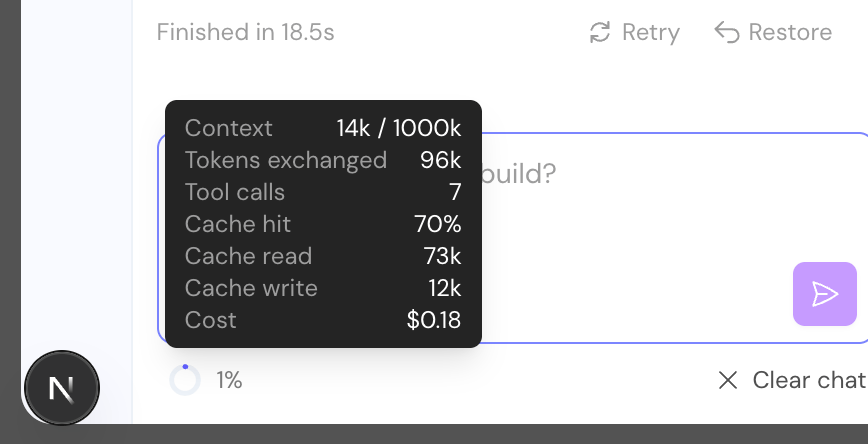
The assistant reports context usage and cost for each turn
Referencing Flow Resources
A key strength of the assistant is that it understands the resources on your flow. When you ask it to display or use real data, it can find the relevant resource and wire it into a block’s label or input for you. Supported resources include:- Entities
- Triggers
- Variables (it can reference variables but not create them)
- Data models
- Live page services
Next Steps
Live Page Builder
Back to the visual builder overview
Live Page Services
Bring server-side data into your pages